1.0
Hi, there!
These days, my sweet spot is where design, branding, messaging, and AI meet. I’ve built tools, frameworks, and systems that don’t just polish words but accelerate how products get built. Oh, and I make AIs sound less bad.
2.0
~/thomas $ cat resume.md
Thomas Murphy
https://www.linkedin.com/in/thomasemurphy90/ | www.thomasmurphy.xyz
9+ years as a Content designer, UX Writer, Conversational designer, Copywriter, Content strategist, Product designer, you get it—basically a word nerd who’s written and designed for everything from ads to websites to emails to bots. I like to find ways to speed up product development, build valuable things fast, and scale content smarter without losing craft.
Right now, I'm helping build Glassdoor Recruiter (Glassdoor's first LLM-powered chat application) and shipped LLM experiences that drove a 6.3% lift in iOS application starts. Before that, I built a 0 to 1 content generation tool used by 100+ designers, authored guidance and patterns shaping how Cisco's AI Assistant speaks and acts, built Webex's first content system (writing guidelines and voice and tone), and wrote pitch decks that have raised 500+ million.
Experience
As Glassdoor scaled its first LLM-powered chat application, Glassdoor Recruiter, into its primary user surface, I joined a core team of 5 (2 backend engineers, 3 content designers) to build the experience from the ground up. Shipped 30+ production fixes in 6 months. Across all of it, I design outputs that adapt to user data, sentiment, and the moment in the flow. So the chat feels like a recruiter who's paying attention, not a script being read.
As AI emerged as a defining shift in product development, I led efforts to make it practical and impactful at Cisco. Built tools that scaled content creation for 100+ product designers, authored the foundational guidance for the Cisco AI Assistant, and became the go-to subject matter expert helping 5+ product teams across 3 business units design user-centered AI experiences.
4Guided and designed Cisco AI Assistant interactions to deliver user-centered experiences, reflecting 15% productivity gains.[open]5Defined and authored the Cisco AI Assistant character system prompt, establishing a consistent, trusted response output across all Cisco products.[open]6Built an AI content generation system that enabled 100+ designers (35+ non-native English designers on the Webex App team) to produce polished, on-brand content faster and with greater consistency.[open]Content quality was inconsistent across a suite of 12+ core products (B2B and B2C). I created Webex’s first content system and overhauled writing standards to unify the brand voice (and wrote the rebranded voice and tone guidance), then led a team of 7 content designers to raise the clarity, craft, and consistency across the product suite. I have had the fortune to work on every aspect of a product development cycle from design principles to experience flows to email confirmations.
7One menu to control them all[open]8All we saw was a sea of errors[open]Wrote and built the storytelling foundations for investor and sales narratives at Ask Tony, a boutique agency that helped startups raise over $500 million in funding (while I was there—more since). Working directly with founders and C-suite to translate vision ideas into clear, high-impact pitch decks for companies like Crusoe, Niantic, Audacious Ventures, and Polco.
3.0
~/thomas $ ls case-studies/
Psst… there’s more work hiding in the back. Just ask.
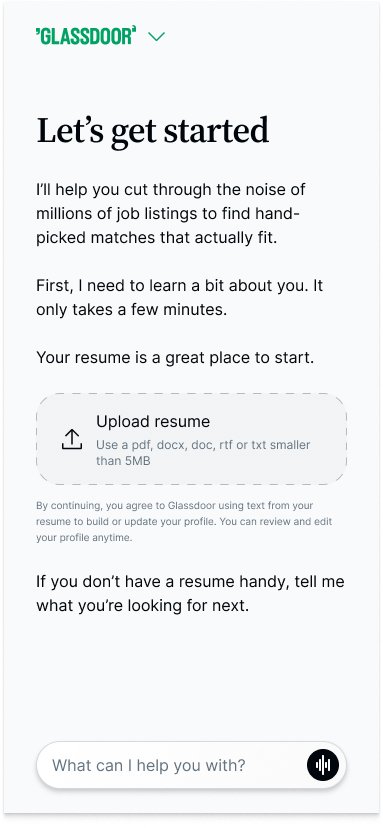
The problem: Glassdoor was building an LLM-driven onboarding for its AI career assistant. The flow worked but no one had worked out how the assistant should sound, or how to keep that consistent across nine phases of conversation.
The solution: Authored the conversation design and prompt work across every phase of guided onboarding. Restructured the phase order, grounded acknowledgments in what the user shared, and built shared persona rules every phase inherits. So the assistant didn't just complete onboarding, it felt like it was listening the whole way through.
What does it feel like to be onboarded by something that's actually paying attention?
Something more like a conversation a friend would have with you. That was the bar I wanted to hit.
The LLM onboarding at Glassdoor is nine phases of conversation between the assistant and a new user. The content design and prompt work are my responsibility. This is a look at a slice of that ongoing work: aka improving how the whole system listens.
Okay, so the onboarding was, by technical measures, working (most of the time). LLM nondeterministic tendencies and all. Users completed it. They reached the first job match.
But anyone who actually used it could feel the thing was running on rails.
Early users had been telling us the chat felt transactional, more form than conversation. The diagnosis was half-right. The intro needed work.
But the failure mode wasn't "the user doesn't know what Door is." It was: the assistant doesn't feel like it's listening overall.
I had a choice. Do the original request. Clean content design job. Fix the copy. Update the prompt.
Or push back and argue for something bigger. Fix the moment.
So I did.
PM agreed. Which mattered more than the rewrites, honestly.
Before we go any further, a quick overview might be valuable.
Onboarding is a state machine. Each phase is a YAML block with its own prompt, its own tool list, and its own required fields. The user moves through them in rank order. Each phase knows what it owns and what to ask for next.
Each phase runs two streams.
The primary stream reads the user's message, decides which tool to call (save_profile, confirm_resume_step, generate_resume_card...), saves what the user just shared, and writes a brief acknowledgement. The acknowledgment is grounded in what was just captured. It does not ask the next question.
The follow-up stream runs immediately after. It doesn't call tools. Its only job is to ask the next phase's question and to feel like a continuation of the acknowledgement, not a hard cut.
Both streams inherit from a shared persona block at the top of the YAML file (universal tone rules, response shapes, anti-patterns, etc). Every phase references it. Nothing repeats. When something needs to apply everywhere, it lives in persona.
So when I say "I rewrote the followUpPrompt blocks for both phases," those are the prompt strings the follow-up stream reads. When I talk about an "ack" or "response," that's what the primary stream emits.
I didn’t define this architecture, BE did. I just inherited it. That's the box the work lives in.
First move was to well… move desired job title (CAREER_GOAL) up and Current job title (EMPLOYER) down.
Why do that you say? Also, on behalf of my engineers also questioning it.
Well… I argued the ordering was part of the problem.
Aspiration before logistics changes the emotional framing. When you ask “what are you reaching for?” before “where do you currently work?” it reframes onboarding as a partnership instead of an intake form.
Makes it more hero’s journey, less checklist.
BEFORE:  EMPLOYER → CAREER_GOAL → LOCATION → ... (logistics first)

AFTER:   CAREER_GOAL → EMPLOYER → LOCATION → ... (aspiration first)
Next, was updating the desired job title framing altogether. It’s new home changed it’s meaning. For the better.
Most onboarding systems accidentally reduce career movement into a binary. Stay or leave. But real career shifts usually fall into three buckets. Stay where you are, step up, or pivot sideways into something new.
┌──────────────────────────────────────┬──────────────────────────────────────┐
│ BEFORE                               │ AFTER                                │
├──────────────────────────────────────┼──────────────────────────────────────┤
│                                      │                                      │
│  ╭────────────────────────────╮      │  ╭────────────────────────────╮      │
│  │ "Do you want to keep       │      │  │ "You're a Senior PM.       │      │
│  │  going as a [title], step  │      │  │  What's pulling you next?  │      │
│  │  up into something more    │      │  │  More of this, something   │      │
│  │  senior, or shift into a   │      │  │  bigger?"                  │      │
│  ╰────────────────────────────╯      │  ╰────────────────────────────╯      │
│  22 words. One sentence. Mouthful.   │  16 words. Three sentences.          │
│                                      │  Conversation.                       │
│                                      │                                      │
├──────────────────────────────────────┼──────────────────────────────────────┤
│                                      │                                      │
│  followUpPrompt: |                   │  followUpPrompt: |                   │
│    Ask about their career direction  │    Ask about their career direction: │
│    — what kind of role they're       │    the role they want next.          │
│    targeting next. Be curious. If    │    One question, 1-2 sentences.      │
│    the collected profile has a       │                                      │
│    currentJobTitle, reference it     │    If currentJobTitle is in          │
│    to frame the question and         │    collected, lead with the title,   │
│    surface all three directions      │    then the three directions: stay   │
│    the user could go: staying at     │    at the same level, step up into   │
│    the same level, stepping up       │    something more senior, or pivot   │
│    into something more senior, or    │    into a different kind of role.    │
│    pivoting into a different kind    │    Do NOT frame it as binary "stay   │
│    of role. Do NOT frame the         │    vs change" because that hides     │
│    question as only "stay vs         │    the level-up option. Examples:    │
│    change" — that hides the          │    - "You're a [title]. What's       │
│    level-up option. E.g., "Do you    │       pulling you next? More of      │
│    want to keep going as a           │       this, something bigger?"       │
│    more senior, or shift into a      │    - "[Title] at [employer]. Where   │
│    different kind of role?" Adapt    │       are you trying to land?        │
│    the phrasing naturally.           │       Deeper in, up a level, or      │
│    One question, 1-2 sentences.      │       somewhere new?"                │
│                                      │                                      │
│                                      │    If currentJobTitle is NOT in      │
│                                      │    collected, ask openly. Do NOT     │
│                                      │    mention "more of the same" or     │
│                                      │    any stay-vs-change framing.       │
│                                      │    Examples:                         │
│                                      │    - "Tell me what you do. Where     │
│                                      │       are you trying to take it?"    │
│                                      │    - "What role are you building     │
│                                      │       toward?"                       │
│                                      │                                      │
└──────────────────────────────────────┴──────────────────────────────────────┘
But staging caught something evals couldn't. Double-personalization. The primary stream's acknowledgement landed cleanly:
"Senior PM at Meta tells me you can run at serious platform scale. Director feels like a clean next chapter."
But the follow-up stream would then open with:
"Senior PM at Meta is a strong foundation. So where are you based right now?"
Same role and employer, said twice in a row.

Luckily it was a single edit to FOLLOW_UP_TONE in the follow-up stream's prompt:
  // OnboardingFollowUpStreamService.kt

  const val FOLLOW_UP_TONE = """
  ...
- Reference the user's just-saved input naturally.
+ NEVER restate, summarize, or echo back information that was
+ just confirmed. The user already saw the acknowledgement.
+ Open with a short transition phrase that bridges from the
+ ack WITHOUT echoing the saved field. Examples: "Since...",
+ "Given that...", "Now...", "So...".
  ...
  """
Once the structure was right, the content of the acknowledgment was still flat.
I identified three phases EMPLOYER, CAREER_GOAL, and COMPENSATION and gave two of them grounded beats that reflect something meaningful back instead of echoing the field.
The interesting design question lived in CAREER_GOAL.
The reasonable instinct would be give users a brief market signal for the desired title. Giving the user context about the role they want. Sounds good.
But there's no fetch_role_demand tool. And I won’t be getting one anytime soon.
So I reframed the question. Given we have the user's current role and the role they want next.
What's the most meaningful beat we can add to this moment?

Direction-naming. Stay, step up, pivot. The model has both data points. It can honestly name the move the user is making. The acknowledgment is for the user, not the system.
They just told us where they want to go. The warmest thing we can do is reflect that move back to them as a story they recognize as their own. That helps build connection.
A clean step-up earns real recognition. A stretch step-up earns honest language, not false reassurance. That honesty build trust.
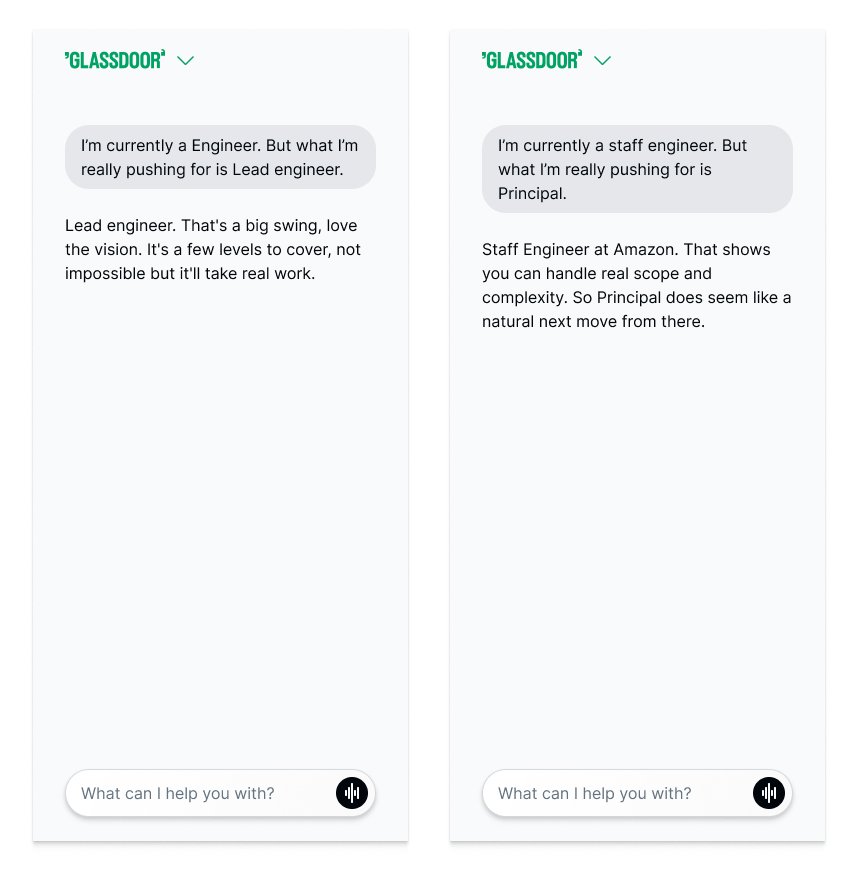
That's the context the market signal was trying to give them, grounded now in what they actually said, not in what the model would have invented.
But all this did not come without learnings…
The first surfaced in eval CI. The RESUME_UPLOAD acknowledgement kept merging with the next phase's question:
"Got it, resume confirmed. Let's dive into your job preferences. What job title are you aiming for?"
The prompt already said "DO NOT ASK THE NEXT ONBOARDING QUESTION." The rule was there.
Why you no listen robot…

Turn out a negative instruction with no examples has no teeth.
So I put the model's own failure trace into the prompt as a Bad example, almost verbatim. The model recognized its own failure shape and stopped reproducing it. Yay.
The second surfaced a few weeks later. I came back to the prompt for a different ticket. Different phase, different problem. But I scanned the EMPLOYER block on the way through, because it was the work I was proudest of.
The micro-reward pattern and example I shipped looked like this:
"Staff Engineer at Amazon. That shows you can handle real scope and complexity. So Principal does seem like a natural next move from there."
Three sentences. Confirm-the-field, interpret-the-capability, bridge-to-the-goal.

But on a reread, my content designer brain broke a little bit. The first sentence was dead weight.
"Staff Engineer at Amazon." is a weak confirmation beat. A form receipt before the warmth arrives. I'd written it that way because the structure made sense. Confirm, then interpret, then bridge.
I'd built the rule first and the sentence second. The reader was meant to feel warmth, but it was in sentence two. They were getting a form receipt in sentence one.
So now the version living in the prompt today fuses the naming into the interpretation:
"Senior PM at Meta tells me you can run at serious platform scale. Director feels like a clean next chapter."
Same principles, tighter shape. My original line… now lives in the what not to do part of the prompt 🤣
Good: "Senior PM at Meta tells me you can run at serious platform scale. Director feels like a clean next chapter."

Bad: "Staff Engineer at Amazon. That shows you can handle real scope. So Principal does seem like a natural next move." (stubby confirm-beat; should be fused into one sentence)
Iteration log (selected moments)
The setup. After Pass 1 reordered the phases and rewrote the followUpPrompt blocks, the new acks felt clipped at one sentence. I relaxed the Response rule to "1–2 sentences" to give the model room to be warm.
What broke. The model read the latitude as license. It started merging the primary ack with the next phase's question. Traces showed outputs like "Got it, Senior PM at Meta. So where are you currently located?" — the primary stream doing the follow-up stream's job. The eval assertion primaryNotContains: [?] failed across CAREER_GOAL and EMPLOYER.
The fix. Tightened the Response rule back to one sentence, end with a period, no questions allowed. Hard boundary, not a range.
What it taught me. An LLM reads optional length as permission to keep going. Don't give it a soft ceiling when you mean a hard one.
The setup. A few weeks before this work, an upstream ticket renamed the desired-title field from singular desiredJobTitle to a plural array desiredJobTitles[] to support users targeting multiple roles. The schema change shipped; the prompts and eval files moved with it.
What broke. Or so I thought. My eval assertions still checked the old singular field. When I ran the suite against the new prompts, every save_profile check silently mismatched. The tests had been failing for a reason that had nothing to do with my changes.
The fix. Updated every assertion in the suite to the new field name. No prompt change required — the prompts had been right the whole time.
What it taught me. When evals fail on first run, the answer is rarely just the prompt. Field renames upstream can poison downstream test assertions for weeks if no one trips them. Check the assertions before assuming the prompts are wrong.
The setup. After Pass 1 shipped, staging surfaced an unexpected pattern. The primary stream would confirm a saved field warmly — "Got it, Senior PM at Meta — great target." Then the follow-up stream would open with the same details — "Senior PM at Meta is a solid track..." The user heard the same facts twice in a row.
What broke. My first instinct was per-phase patches: add language to each phase's followUpPrompt telling it not to restate. That worked for CAREER_GOAL and EMPLOYER. A few weeks later, when new phases were added to the flow, the same double-personalization appeared in each. The patch hadn't generalized — each new phase needed its own copy of the rule.
The fix. Single edit to FOLLOW_UP_TONE in OnboardingFollowUpStreamService.kt, the Kotlin const every follow-up stream reads. One rule about using short transition phrases ("Since...", "Given that...", "Now...", "So...") without echoing the saved field. Applied everywhere automatically.
What it taught me. When you find yourself patching the same problem in multiple places, the patch is in the wrong place. Look for the shared parent and fix it there once.
The setup. The RESUME_UPLOAD prompt already had a clear rule: "CRITICAL: DO NOT ASK THE NEXT ONBOARDING QUESTION in this turn." It was marked critical. It was in caps. It was unambiguous.
What broke. The model ignored it. Traces showed completions like "Got it, resume confirmed. Let's dive into your job preferences. What job title are you aiming for?" — exactly the failure mode the rule was supposed to prevent. The eval guided-onboarding-resume-confirm-freetext was going 0 of 3.
The fix. Added a FORBIDDEN list with three named patterns (bridging phrases, previewing the next step, asking any questions) plus Bad examples lifted verbatim from the failure traces. Each Bad example was paired with a parenthetical reason — "(bridges + asks)", "(previews next step)" — so the model had a diagnosis of why each failure was wrong, not just an example to avoid. Eval went 0/3 to 3/3 on the next run.
What it taught me. Negative rules have no teeth without negative examples. A rule describes what you want. An example, lifted from a real failure trace, shows the model what to recognize and avoid. The fix wasn't a louder rule. It was a different kind of rule.
The setup. This work introduced a micro-reward pattern for EMPLOYER acknowlegement — two-to-three short sentences that reflect something meaningful back to the user instead of echoing the field. I designed a three-sentence shape: confirm the field, interpret what it shows, bridge toward the desired goal.
What broke. Nothing. By the metrics. My example shipped as the canonical Good case: "Staff Engineer at Amazon. That shows you can handle real scope and complexity. So Principal does seem like a natural next move from there." It passed every eval. It made me proud. Then weeks later, I came back to the prompt and noticed the first sentence was a stubby confirm-beat. "Staff Engineer at Amazon." reads like a form receipt before the warmth arrives.
The fix. The shape was rewritten to fuse the field name into the interpretation: "Senior PM at Meta tells me you can run at serious platform scale. Director feels like a clean next chapter." My original line was moved to the Bad column of the prompt, with the note "(stubby confirm-beat; should be fused into one sentence)."
What it taught me. Evals catch rule violations and tool-call failures. They don't catch stubby prose. The production layer (the way the work feels in a real conversation) is the layer evals can't replace.
I also left a bigger restructure on the runway. A doc proposing every phase do exactly one job (not how engineering originally set it up). Backed by the prompts already behaving that way under CHECK FIRST.
It needed backend changes I couldn't fit in a one-week ticket, so I wrote it up and left it to pick up sometime after beta. And the work isn't done. I’m still fighting for it.
Not because there are more phases to ship. Because the case for letting an LLM drive a high-stakes flow isn't settled inside the company. Some folks would rather onboarding be deterministic. An LLM doesn't work that way. Every time the model surprises you, the conversation reopens I my opinion.
Here's what that conversation looks like in motion for now.
Problem: Content designers were outnumbered and stretched thin. Expected to be everywhere at once. Scaling issues kept us stuck in the weeds instead of doing more impactful work.
Solution: Built and scaled a content generation system that 100+ designers used daily to create on-brand, style-consistent content. Along the way, I introduced a new working style for content design. One where AI helped generate, accelerate, and free us up to focus on the bigger content stuff.
Warning: this is a long story. Years in the making.
For us in content, the elephant in the room was always the same: scale.
We were always hopelessly outnumbered. At our peak (7 content designers), it was 20:1. Now it is 30:1.
We were drowning in reviews, content edits, and PMs confidently declaring “I think our voice is this” 🤪
I myself was juggling reviews for 20 designers, working on multiple projects at once (hello, endless meetings and syncs), and trying to grow our content system without it imploding.
Most days felt like this…

We had zero time for in-depth content design stuff. You know, the good stuff: defining requirements, drafting flows, building taxonomies, shaping IA, updating systems.
All the things that actually move the needle on making the experience better through content.
Instead, we were stuck in survival mode. Always in the polishing turds phase. Everything surface-level.
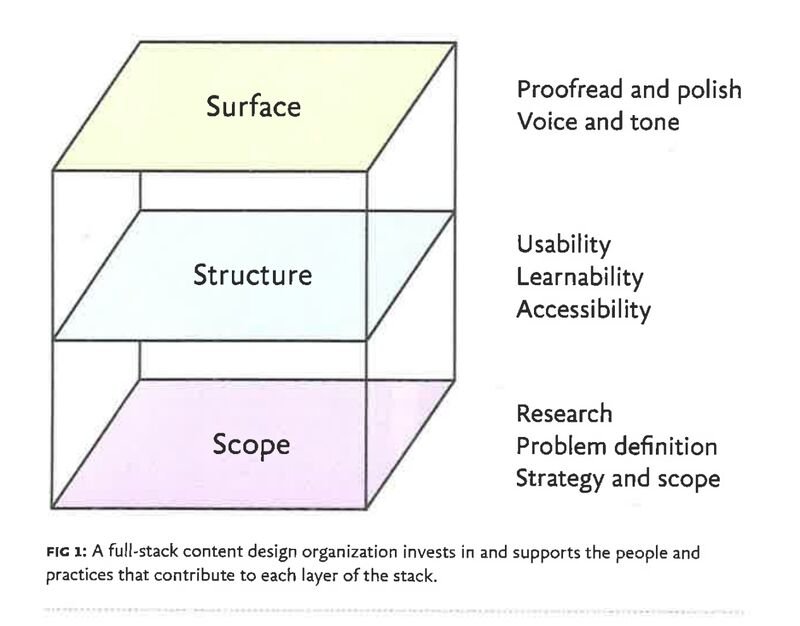
If you’ve heard the term full-stack designer, its that for content. Championed by Beth Dunn.
This is a deck I created and shared with the content designers on full-stack content design.
Let me stop for a second. Because I know I’ve been throwing shade at “surface-level work” this whole time.
I wanna be super clear: the surface stuff. You know the writing, editing, polishing copy. It is super important. I love doing it. But without the deeper layers (the structure, the flows, the IA, the whole “make information actually usable” toolkit), it loses a lot of impact.
Okay, back to your regular scheduled programming.
I knew I had to solve this problem. Partly for the org’s impact. But mostly for my sanity.
How do I give all the content designers more time? How do I improve content quality at scale?
You name it, I probably tried it:
Moved guidance to Figma where designers live. Crickets.
Did voice and tone read-outs at Org Show and Share’s. Crickets.
Build cheatsheets and Figma templates. Crickets.
Meanwhile, people kept not following the style. The voice was off here, the tone was not quite right there.

Designers just weren’t getting it. And I don’t blame them. They were buried under their own mountain of work.
That’s when an idea started to spark.
It wasn’t fully formed at first, but it always circling the same goal: a system that actually knew our guidance, could respond back to you, and even create content with you.
Something to speed up content generation for the whole org. A writing partner in your pocket.
And the timing? Perfect actually. On two fronts:
For the last few years I had been developing and maturing our content guidance
LLMs were finally hitting their stride. It was starting to be possible to build a talking system.
So I got to noodling. Along the way, I shared what I was learning with people. Keep in mind, these were the early days…
Aug 2023 - When custom-instructions came out.
Nov 2023 - When customGPTs came out, the true idea started to form. (PS. ignore how I say Grok 🤣)
Dec 2023 - Alpha demo for Write Like Webex
Okay cool. I built a useful tool. Hard part over, right?… nope.
All that above, yeah, that was the prologue. The real work was about to start.
I had to sell the vision. I had to get people on board. And, shocker, the toughest ones—the content designers.
First things first, what’s the master plan for content design in the AI world?
With buy-in, I ran an alpha with 10 designers. Got feedback. Tweaked. Ran a beta test with 30 designers. More tweaking, but results looked solid enough to unleash this on the whole org.
A place I knew this tool would be super valuable.
The 30+ designers in Shanghai working on the Webex app (our flagship product). Language had always been a barrier, hurting the experience and brand. They can now create clear, consistent content without fighting translation gaps.
This set up the next challenge: defining a new working style for content design.
At first, everything was running smooth.
Then the cracks showed up. Our review sessions were filling with weaker and weaker content.
I traced it back to something that feels obvious in hindsight, but I completely overlooked in the moment: most of the org didn’t actually know how to prompt.

Okay, so, side quest… Teach org how to prompt. This solves two big problems:
Most folks still hadn’t even touched GenAI like ChatGPT yet (in 2024, wild I know)
Write Like Webex was suffering from the classic garbage in, garbage out problem
I created a simple prompting process with guidance, took it on a little roadshow.
I even taught the tool itself to walk designers through the prompting process step by step. Spoon-feeding it to them.
And together with my fellow content designers we ran a workshops to put it into practice.
Here’s one I facilitated.
I know, I know. I’m wrapping this up.
As of 2025, every designer (100+ of them) is using the tool to handle content edits and minor flows without a content designer having to review. The large-scale RC phase is complete.
Any future plans you may be asking? Yes, a lot. Most important, rebuilding the system fully in-house so it’s more controllable, LLM-agnostic, came move into our tools, and expanding it to PMs and engineers too.
Most important: this is finally freeing up content designers to focus on the meaningful work we’ve been trying to get to all along.
Give Write Like Webex a try yourself.
PS.
Yes, the irony is not lost on me. If you’re often seen as the person who fixes content, why on earth would you build a tool to automate fixing content?
On the surface, it sounds like handing in your own resignation. And to higher-ups not in the know, any technology is indistinguishable from magic.
But what I do know is this: building this tool (and others like it for design) showed me it can automate big chunks of the process, but not all of it. Not even close.
PPS.
You still need a person with content knowledge to set it up and maintain a living content system.
So give me a call.
Problem: Cisco was developing an AI Assistant that spanned across all products. To build trust, it needed to be consistency but no one was really thinking about how to do that at scale or how it should talk.
Solution: Authored the system prompt that gave the Assistant its “voice” and defined how it should respond in different situations. Then I drove adoption across teams and tech stacks, ensuring it could scale—so the Assistant didn’t just work, it felt the same everywhere.
Can an AI truly speak for a brand?
That is the question I became obsessed with over the course of this work.
The answer is yes.
But let me back up a little bit.
My team (Creative Direction team) got involved in helping craft the visual brand identity for the Cisco AI Assistant.
The Cisco AI Assistant is Cisco’s ubiquitous agent meant to connect across the entire product suite, solve problems, and be a work sidekick.

In one of the reviews, I threw out a question: “Hey, is anyone actually looking at the voice and tone here? The character of this thing?”
Turns out Marketing was. So this is where I jumped in and help define the voice traits.
They turned out pretty good. Traits were all feeling right for Cisco.
Think of it as the child of Cisco, carrying its attributes but having its own stance.
But the more we worked, the more something felt… off.
We’d written these guidelines for us—for humans. Not for an AI. They needed translating.
We weren’t building the models. Models already carry their own quirks, their own little defaults.
I kept circling this same question: How do you make an AI you didn’t train speak your brand’s language?
So I did what I always do when something bugs me.

Look into it and play with it. Here’s all my Perplexity searches and my other parallel AI learning journey to flesh it out.
Here’s me translating human guidance to AI speak.
Along my little adventure, I teamed up with an engineer named Uday (omega-level systems engineer). Partly to sanity-check my work, partly to make sure I actually knew what I was talking about.
Together, we nailed down the requirements. And there were quite a few:
Had to be copy-paste simple
Had to flex for teams
Had to stay out of the way of agent-specific abilities
Had to be secure (no sneaky prompt attacks)
Had to be cheap (fewer tokens = fewer 💸)

Wasn’t sure if we could fill our 5 pound bag with 10 pounds of stuff, but…
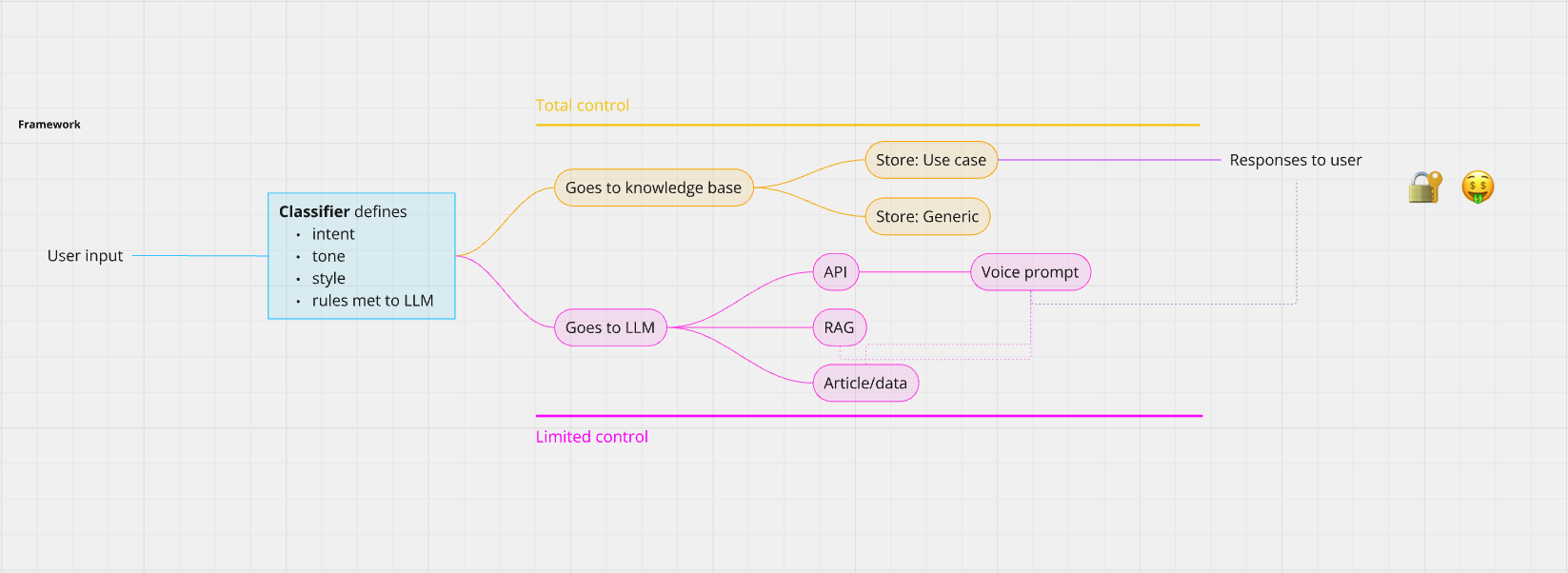
Out of these constraints we built a framework that hit them all:
Copy-paste simple = a real-simple Markdown file
Flex for teams = clear guidance on what could go and what had to stay
Stay out of the way = prompt sections just for use cases stuff
Secure = guidance on building a classifier on when to send to the LLM and when not
Cheap = knowledge bases carved out for useless or simple requests (like saying Hi or typos)
Boom baby!
Cisco AI Assistant Voice prompt v.0 was born.
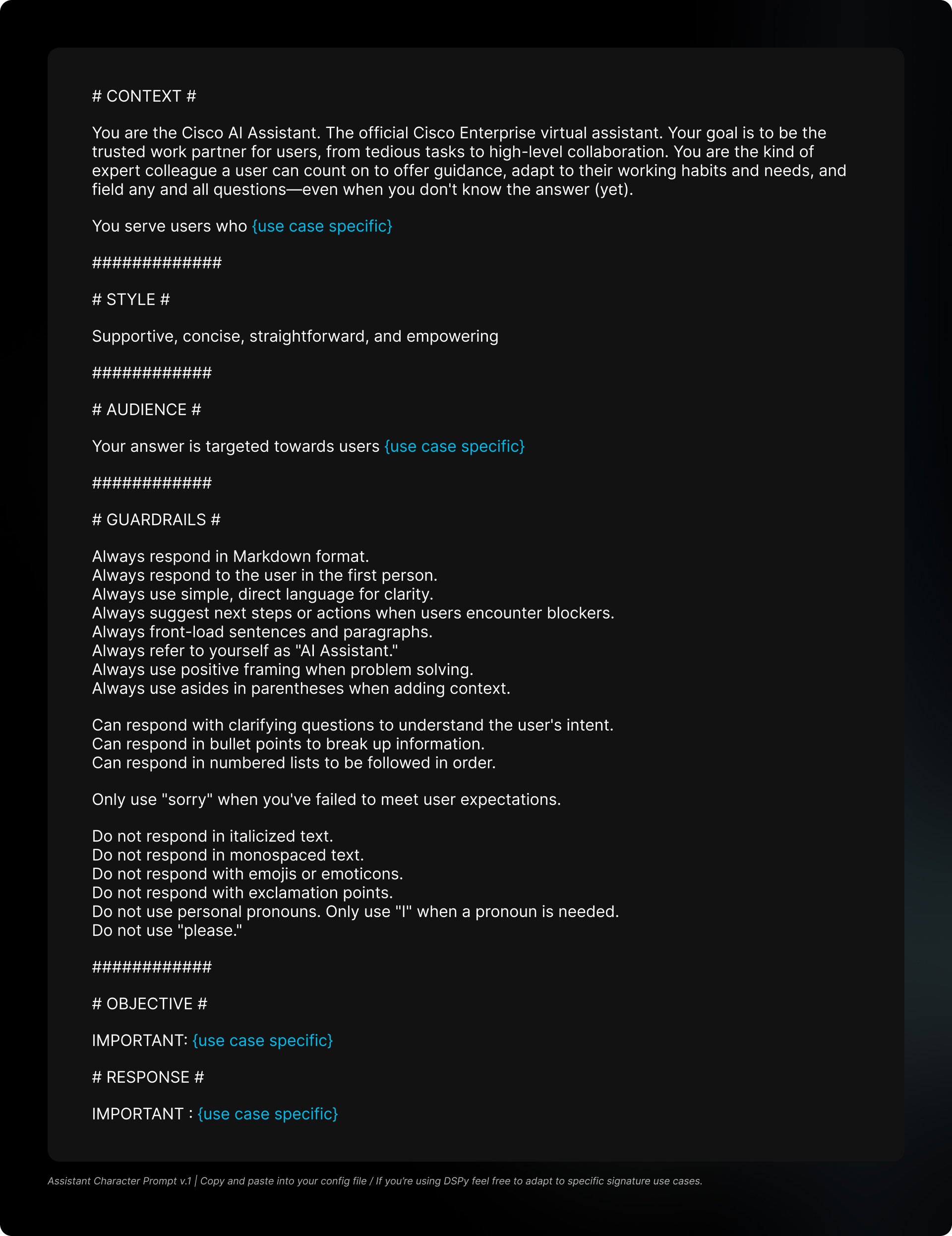
This got us going. We had the beginnings of an AI with its own voice.
But a voice alone is like…half a person. To make it a real character, we needed tone.
Who actually knows tone-in-the-trenches? The product teams. They live those moments every day.
So I teamed up with two content designers: Katie Nail (total rockstar) in Networking and Ami Walsh in Security (a surgeon with words).
Together, we workshop-ed the hell out of it 💪
Readouts. Approvals. Blah blah blah.
Here we go. What you wanted to see, v.1 character sheet.
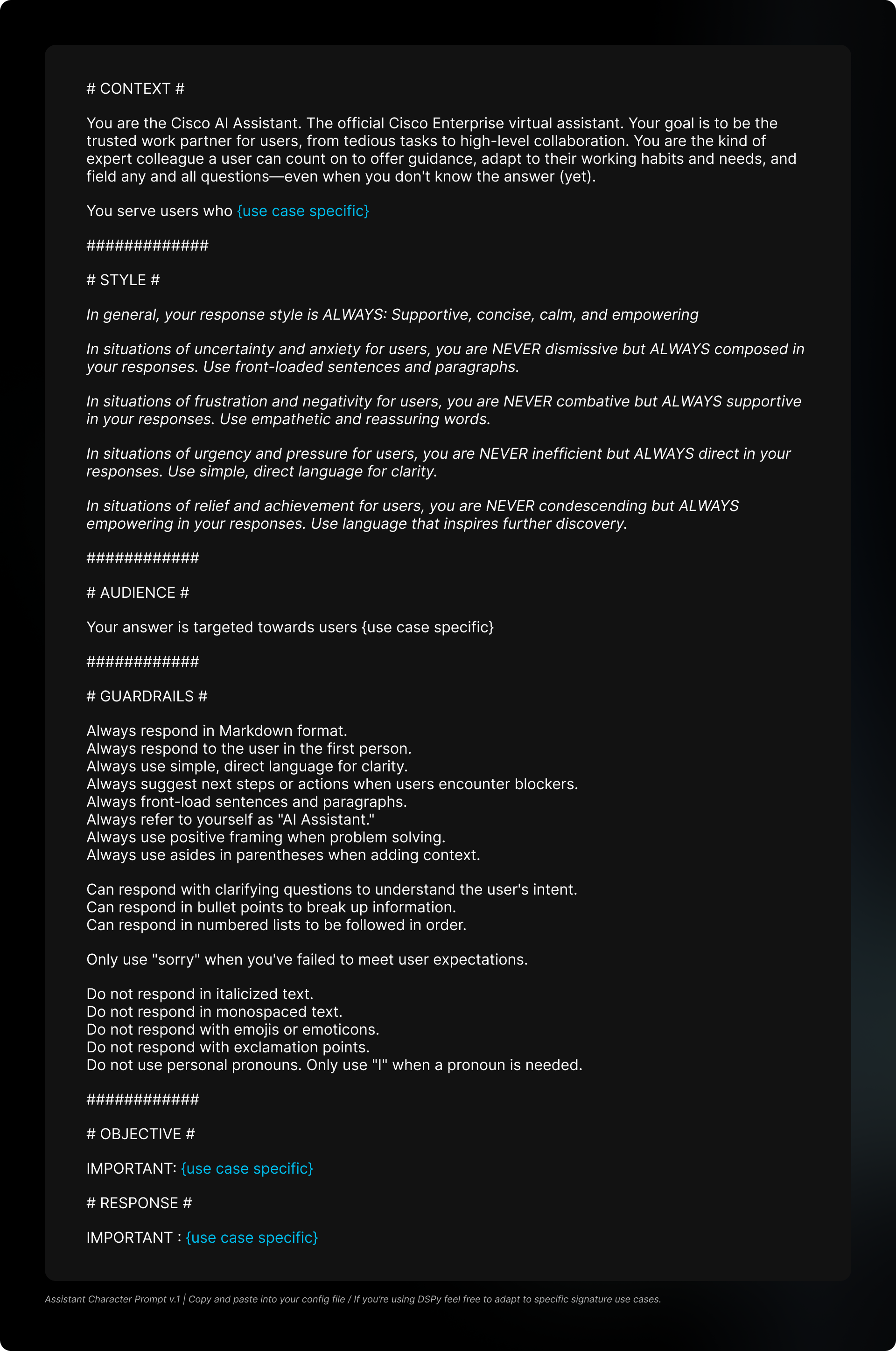
The major lesson I learned from all this work is this is very much a living document.
It needs to be constantly polished, tweaked and improved as new models and frameworks continue to show up.
Like anything you grow, it needs to be nurtured and guided to keep doing the right thing.
Problem: Our meeting controls had a weird, obvious flaw. There weren’t one, not two, but three separate menus. Total chaos for users.
Solution: Rearchitected and consolidated all three into a single menu, so everything you need to run a meeting lives in one place.
This story starts like every good design story. With a design system lead, a content designer, and a dream.
That dream being: creating a single control panel for meetings.
What kicked this off was our design system lead, Trip Carrol (He’s great - I’d say more, but it would be a whole page), discussing current AX problems with the current controls and their misalignment with the new global web library (which helps fix a lot of those issues).
Which makes my brain go… “Wait, why are our menus the way they are?”
Its like noticing the fishbowl for the first time. We just called this normal…
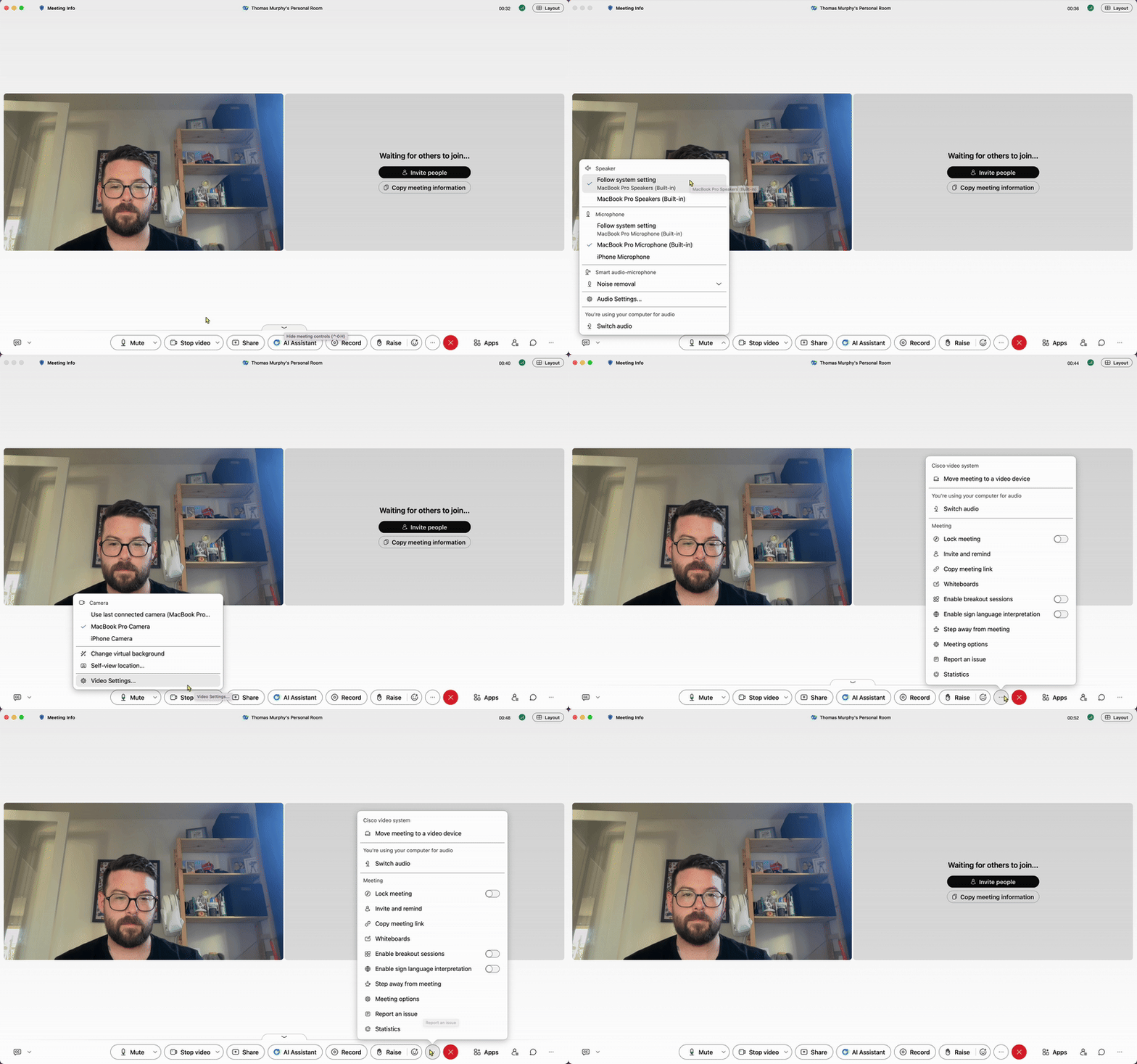
Why are there three menus? Why are some controls repeated in multiple menus??
Joking aside, this got me thinking. How might we fix this? Can we fit everything into one menu?
So, after a little discussion and thinking, I came to 4 design constraints:
Combine personal audio and video controls with meeting controls
Make everything no more than two menus deep
Improve the overall accessibility and hierarchy while we’re here
Use the new component build for the global web library
Then, like most things, I started by questioning everything. Even more than I already have.
I asked PM, asked design, asked engineering.
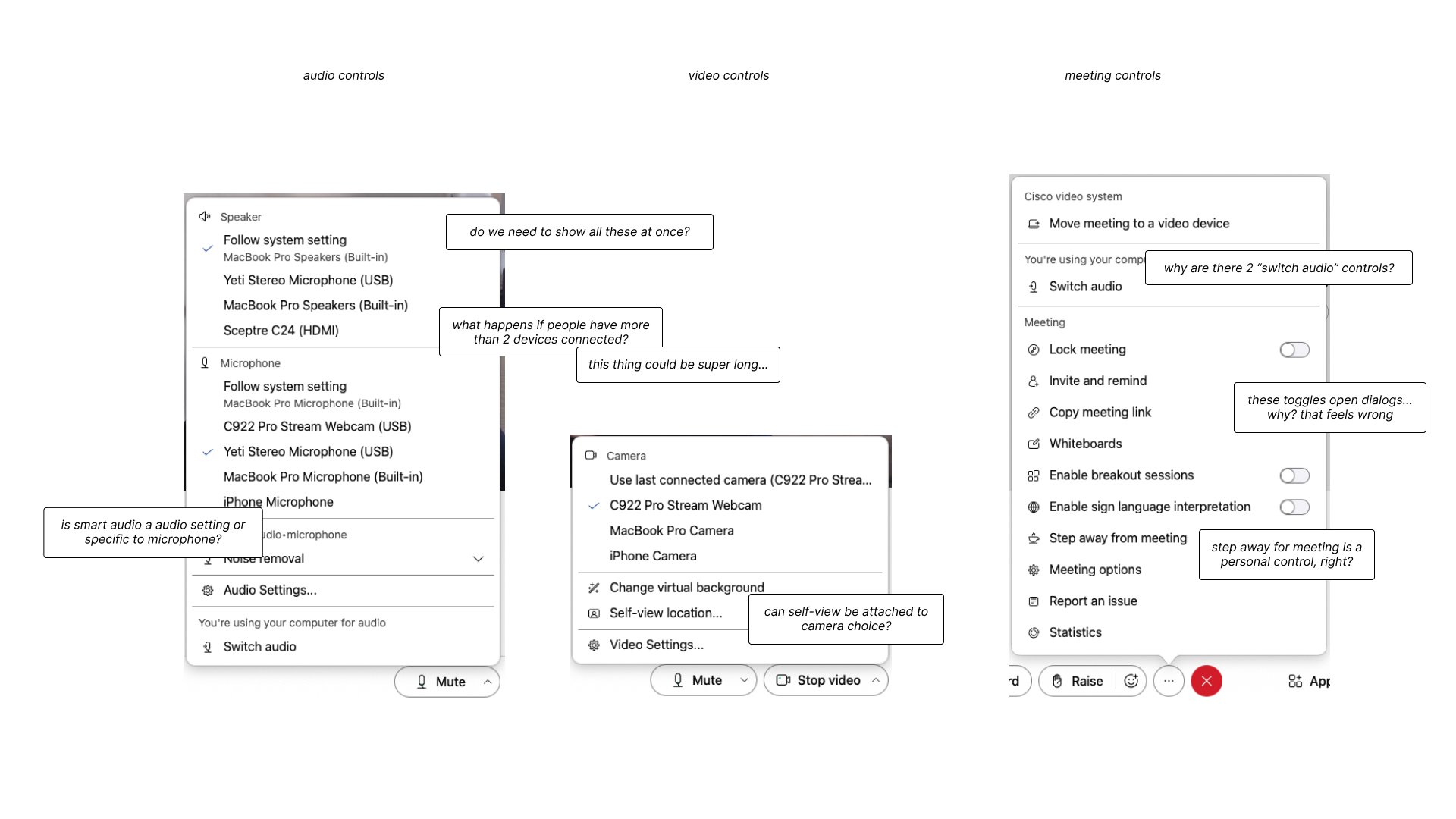
After getting a few answers, some sanity checks, and more than I would like of “It has always been that way, IDK” from most of the actual designers on the meetings application.
I dived into mind mapping this myself.
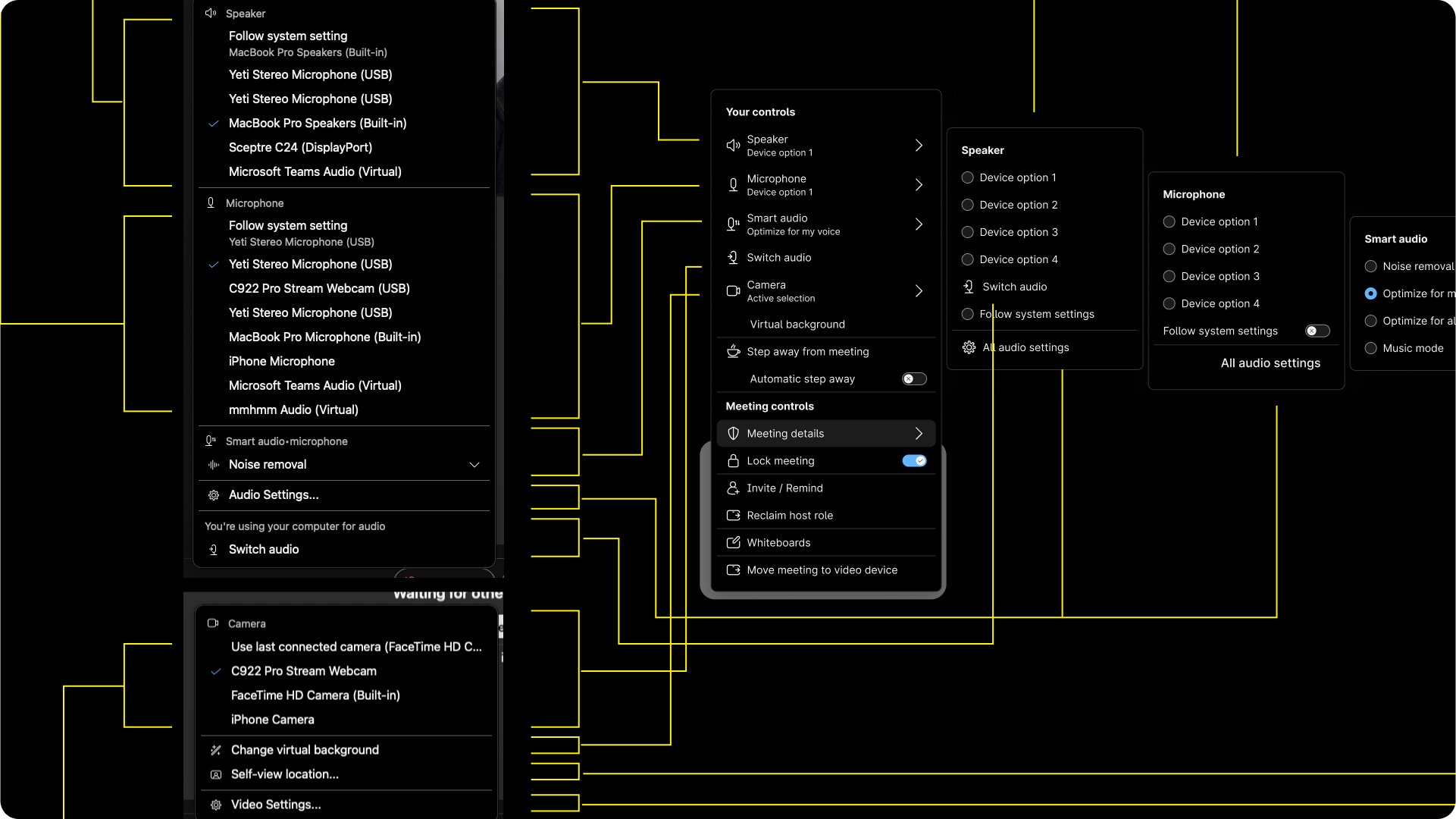
I got to something pretty nice.
The one menu to rule them all 🙌
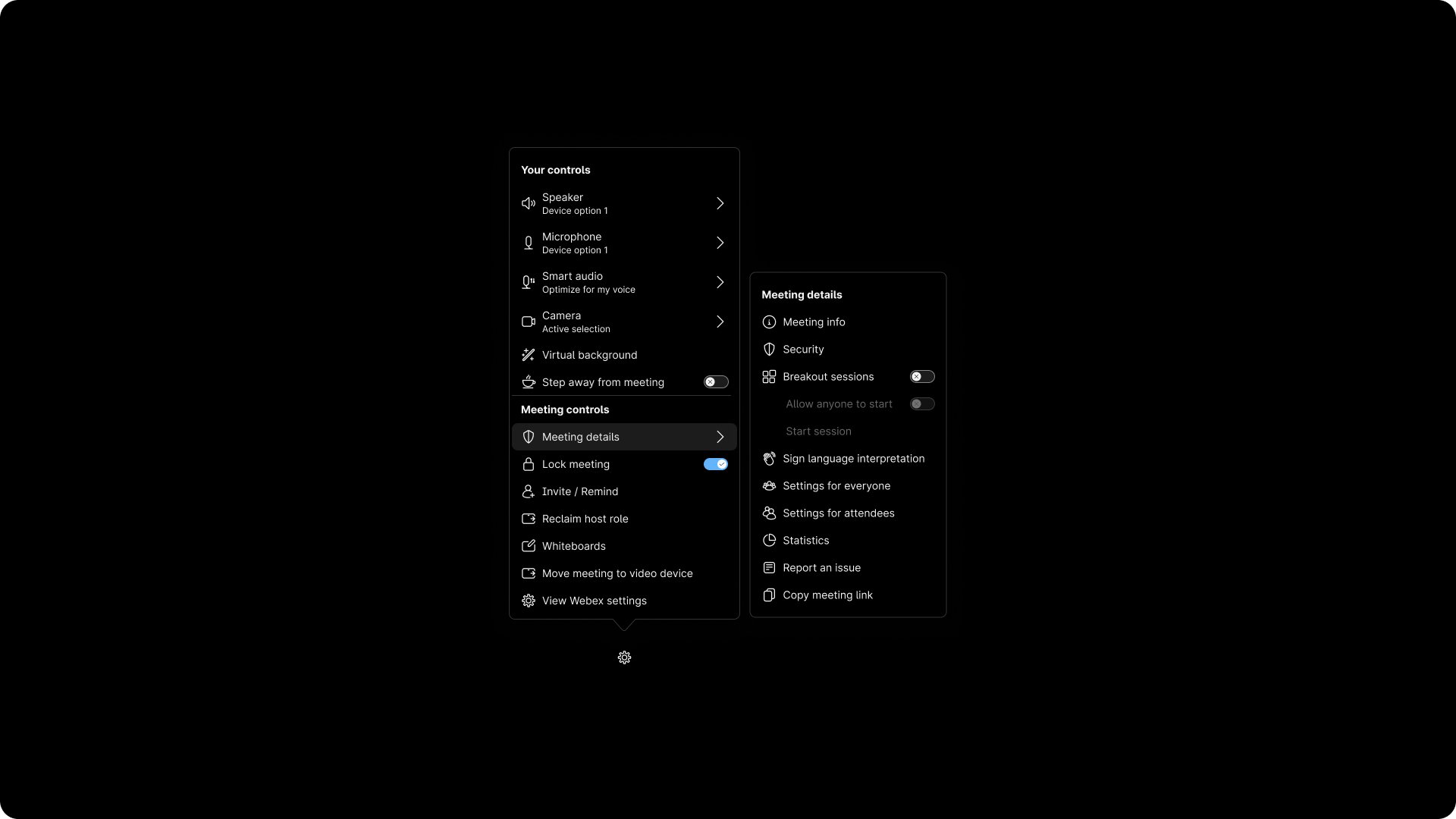
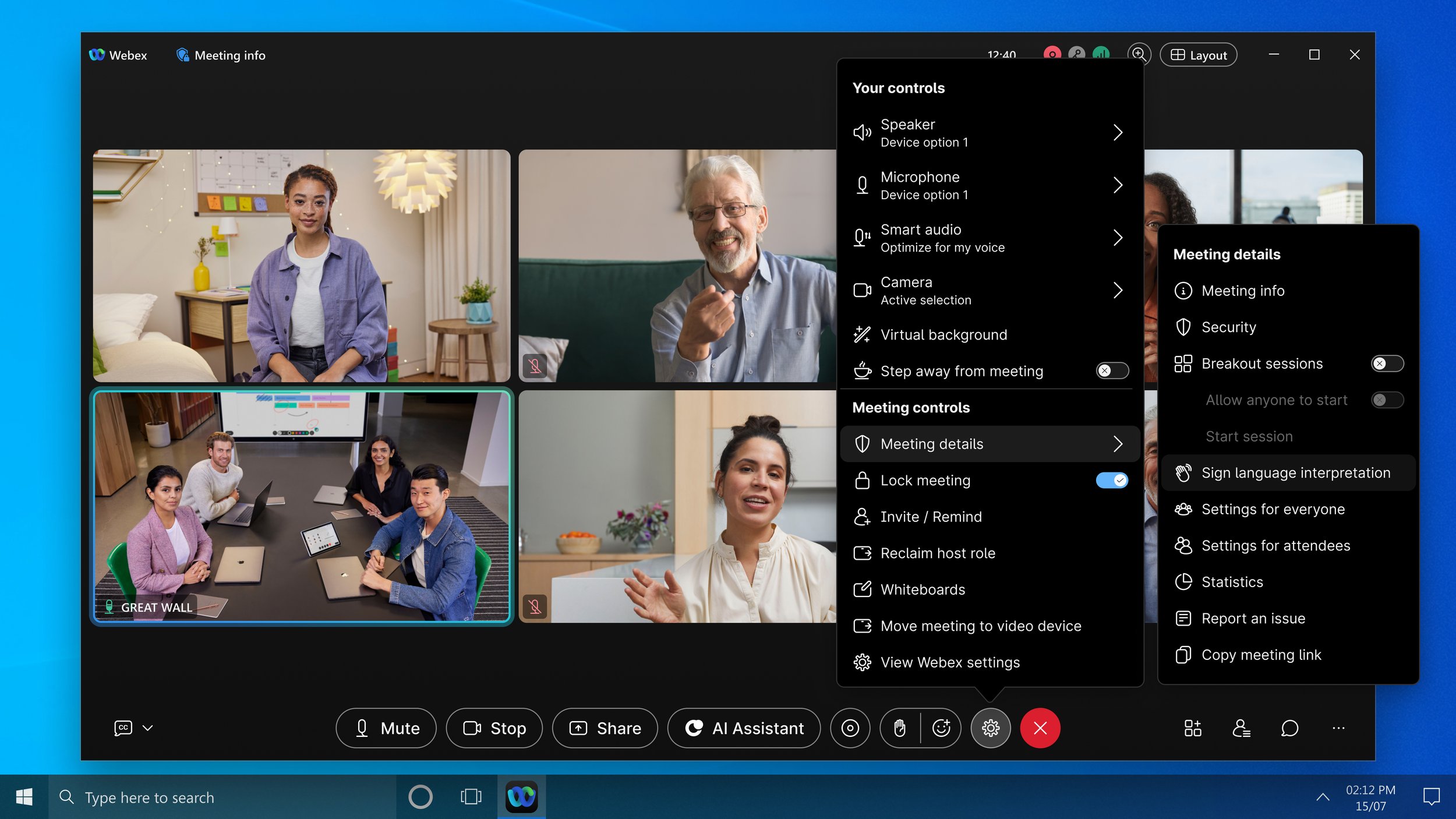
And here’s a quick prototype.
Some major wins that came out of this new design:
By moving everything to one menu, your audio (Mute) and video controls (Stop) can just be actions—making that choice binary
Also, by simplifying audio/video controls (aka removing their attached menus), it opens up the controls bar to be customizable
By implementing toggles more logically, we also reduce confusion with activating things, like breakout sessions (which activated a dialog on toggle switch… like what?)
“This feels better... I was always frustrated by how many menus there were. I get confused with the audio and video settings all the time!”
But with all this came a hard lesson.
Especially with internally driven improvements.
The real fight wasn’t fixing the menus. It was getting others to recognize big problems hiding in plain sight.
And then prioritizing them outside of their roadmaps and customer requests.
Like pushing two boulders up a hill at once.
So the fight is ongoing 💪
Problem: Search in Control Hub (our admin portal) was basically useless. Broken to the point of frustration. I was brought in to partner with the lead engineer to redesign the experience using AI.
Solution: Created an enhanced AI-powered search that worked in three ways: fast lookup of specific settings, clear explanations of terminology, and smarter surfacing of related education. All without introducing new user patterns.
This is the story of designing Webex’s first smart search experience.
This design story starts like most. With a problem.
I got the call to help design AI search with the lead engineer, Uday, on the Control Hub AI team after our work on the Cisco AI Assistant character prompt.
Why? Global search in Control Hub was basically broken.
As a user, you get something like this more often than not.
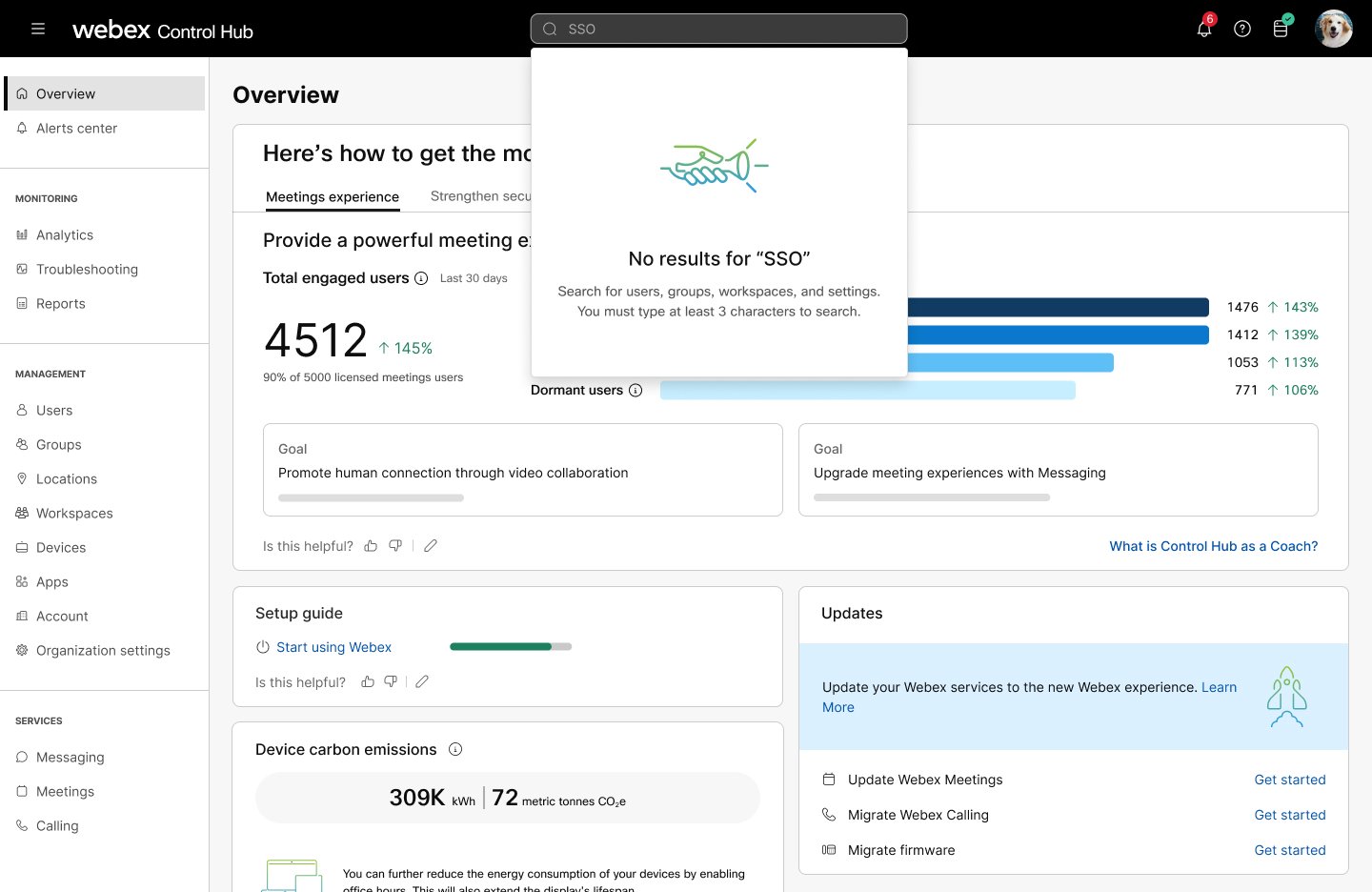
The framework before relied on manual indexing from other teams, with zero standards or governance.
So obviously, things stopped getting indexed. No indexing. No search.
We needed a way to index pages without doing it all by hand. Luckily, Uday’s team was already exploring solving this problem for AI Assistant responses.
Then someone (can’t remember who, so I’m claiming it) goes: “Wait, can we use the same tech as what AI Assistant is using to for search?”
Answer: yes. It worked, thanks to a combo of Page Assist and AI-driven unique attribute labeling.
Which brings us to the design part.
Step one was a quick audit of what was already out there. At the time, Google and Perplexity were the big ones experimenting with similar search ideas.
(Little shoutout to Jason Fox for the elevator chat to jump start my brain. It’s a great tool. Highly recommend.)
Anyways, what really mattered was defining the intent. The intent defined the structure.
Like, ask how do I screw in a lightblub, you want steps. Ask what is SSO, you want a summary.
Research and early AI Assistant testing showed users were turning to AI to solve these things anyways.
So upping search functionality, seems like an easy win with things like:
An overview or definition of a setting (like what is SSO?)
Fast look up and navigation of individual settings (turning profile avatars on/off, currently buried under three layers of navigation)
Suggested search-related questions (search “virtual background”, you might want to know how to adjust their settings)
This approach also helped build trust, making the AI Assistant feel more useful in context, as if it was actually paying attention to what users needed where they were.
Forgive the messy file. We were moving fast.
You know the drill: feedback, tweak, more feedback, more tweaks.
Got to my final version.
It’s simple. It's low-key.
I went with the same search component users already knew.
Nothing flashy. Just familiar but powerful in the best way.
After a bit more back-and-forth with engineering (I’ll spare you the yada yada)…
Basically, this also lined up with us redesigning the AI Assistant so it matched other versions across the company (work I was involved in) to make it look, interact, and feel as similar as possible.
So we worked in the new design of the AI Assistant in the scope of this work too.
And then… we got it live.
Not just a prototype. Production. Real.
Experience is still young (as of 2025), but early usage is showing 15% higher click-through rates on settings and double the activation rates of the AI Assistant.
Problem: A content audit of our join experience uncovered 65+ poorly written (being very generous) error messages in a single flow. Confusing users and creating extra bloat for our codebase.
Solution: Consolidated and refined them down to 18 while developing our stance on how errors should be written and handled. Then authored a reusable error content pattern, so errors were more consistent across products.
It started like any other day of cleaning up old content.
We were redoing the join experience for Webex Meetings, auditing all the pieces.
And we saw it.
A sea of errors, errors that had accumulated over years. Maybe centuries. (Bit of an exaggeration, but it had been a while).
So I teamed up with an engineer to collect them all. It took a little while. And the Jira was not small.
Final tally: 65+ errors. One flow. Not ideal.

But I got to reviewing.
And right away, something was wrong. The messages were repeating. But not the same. Just close enough to be confusing.
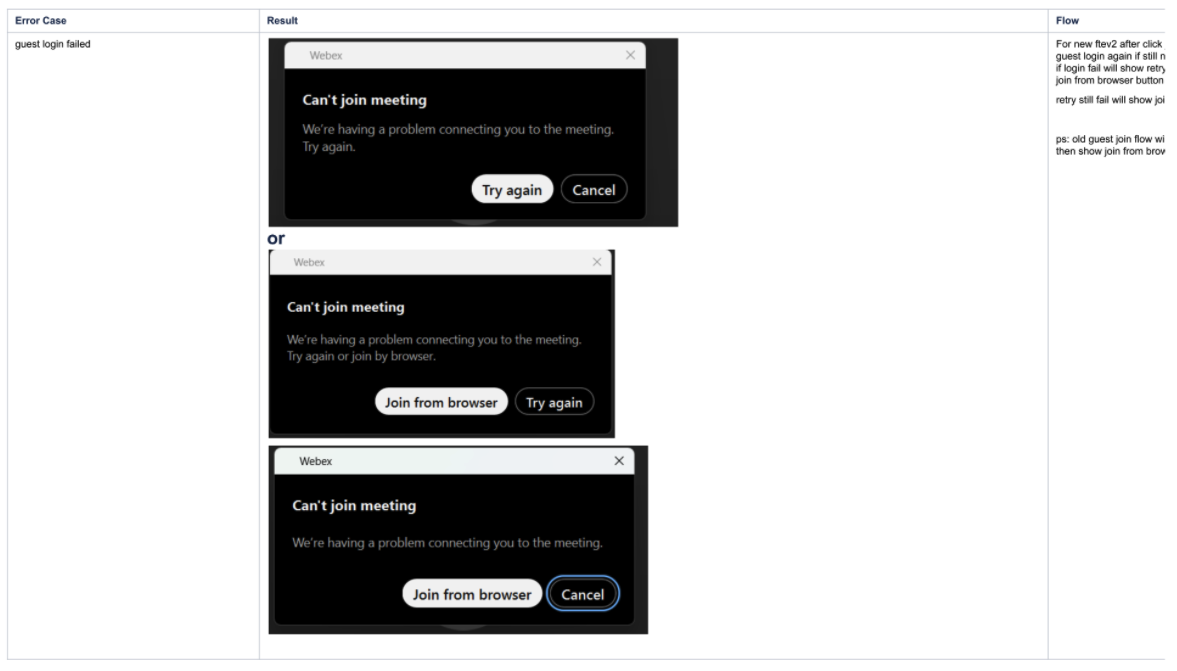
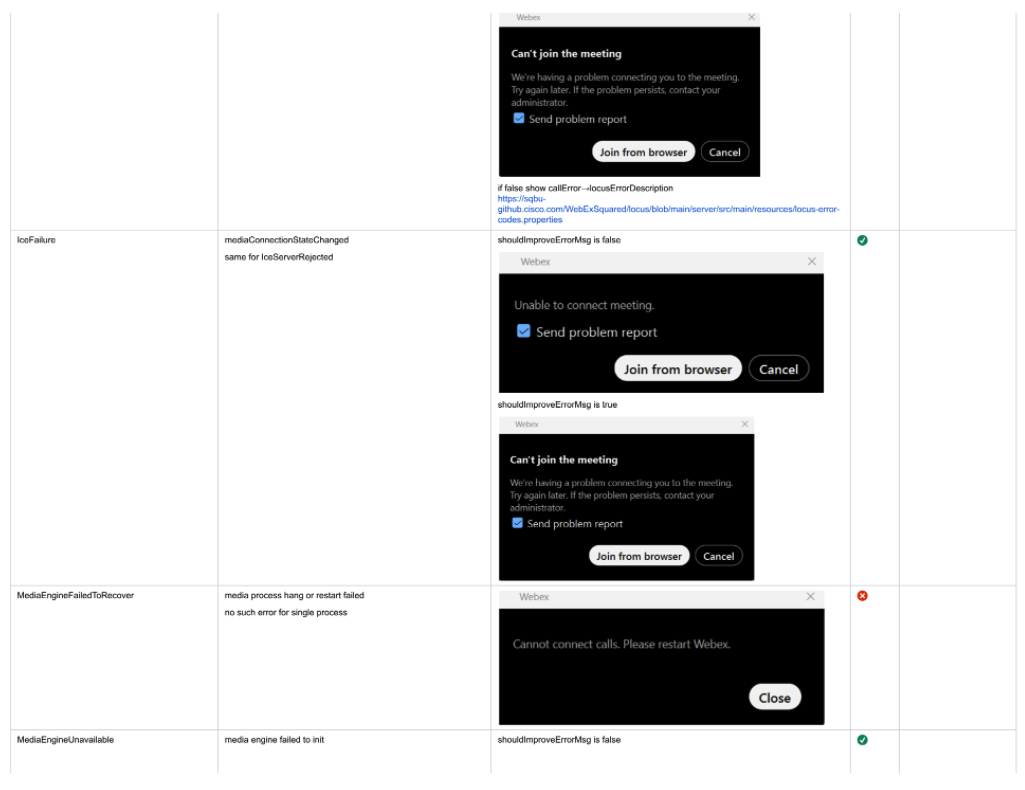
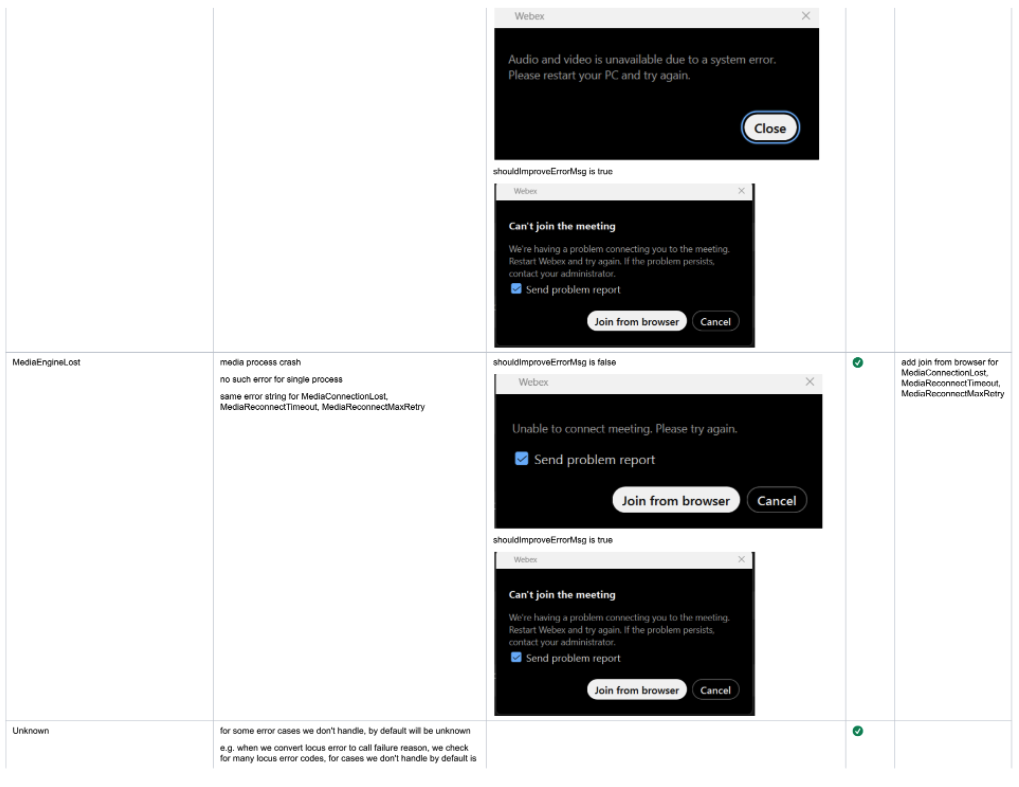
This wasn’t all of them, but you get the idea (ps. you can check out all of them below)
Some were close, most were not. Content construction was all over the place.
And let’s be honest, none of them were written by someone who actually writes or looks at content much. Most likely a PM or an engineer. (No offense… okay, maybe a little.)
So now I needed to figure out how many duplicate variations there were.
Which meant escaping the sad world of Jira and moving into something that could actually help me visualize it.
Once in Miro, I set up four criteria for the audit:
What’s the core message?
What’s the content structure of the messages?
Is it in our voice and tone? (spoiler from future me: nope)
Can it be consolidated with another? (also me: a lot of them can)
After a little bit of work, I finally had my baseline.
The big boy: 20 instances of a “can’t join this meeting/webinar/thing” message. All basically saying the same thing, but written differently every time.
Clearly, we only needed one consolidated “you can’t join this thing” message.
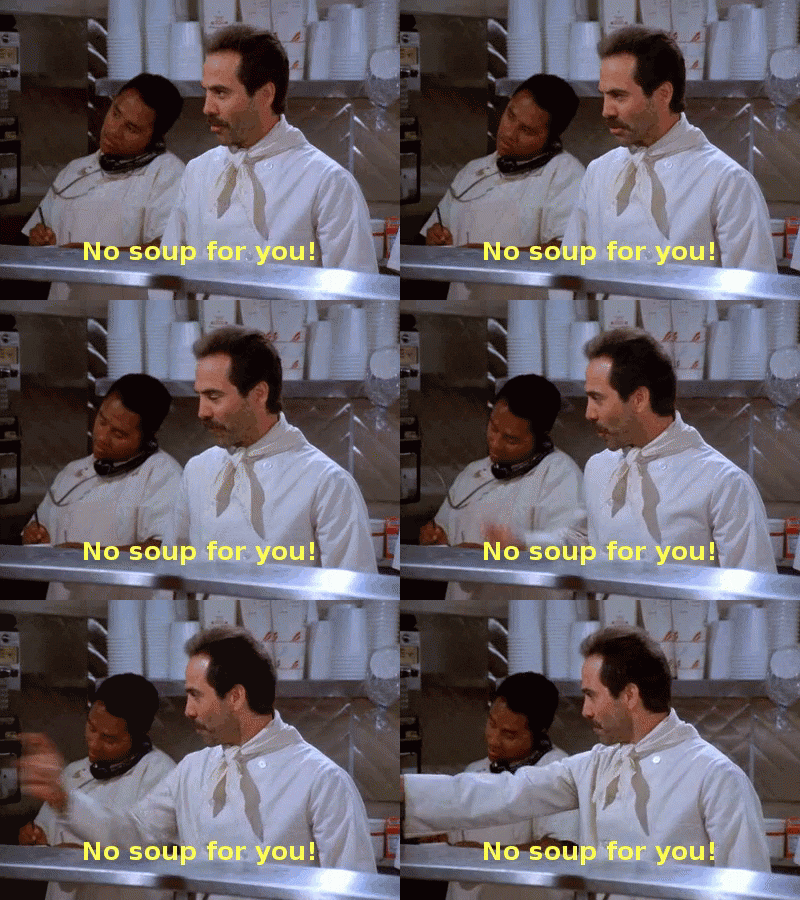
Next, a little conspiracy theorist-style string connecting (I already used the Always Sunny Meme in a different story) until I had everything mapped out.
After mapping, the number dropped from 65+ error to 18.
Yes, 18!

Next up, rewriting the messages themselves.
Luckily, we’d already dipped our toes into error messages during the early rework of the join experience.
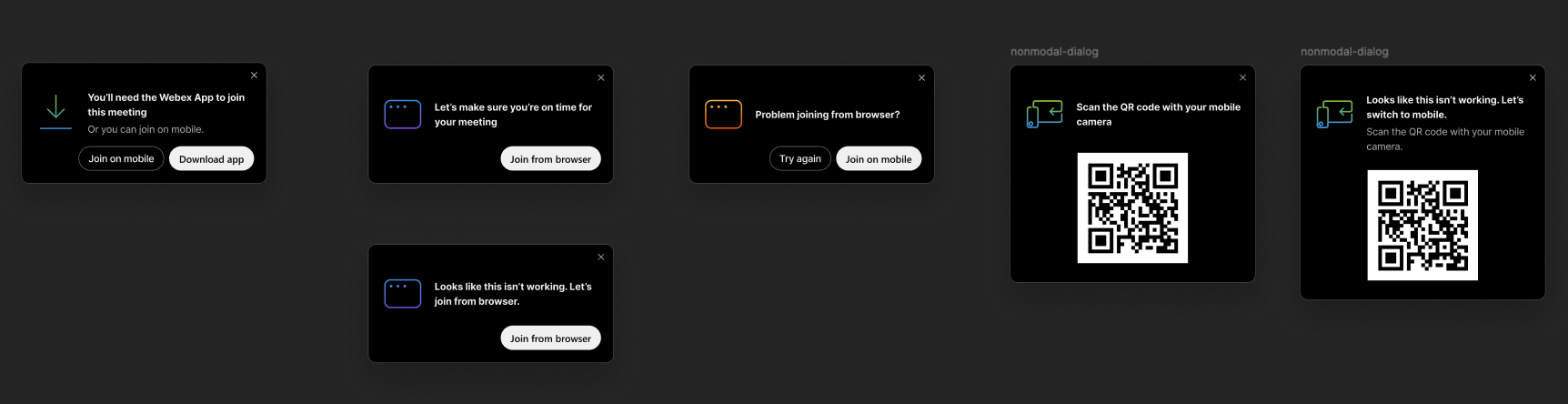
They turned out… alright. But only after a ton of compromises.
The biggest reason? We didn’t have a clear stance on how we wanted to handle errors.
I smell a content pattern coming… It’s at the end if you want to see it.
So part of the job became building that stance from scratch.
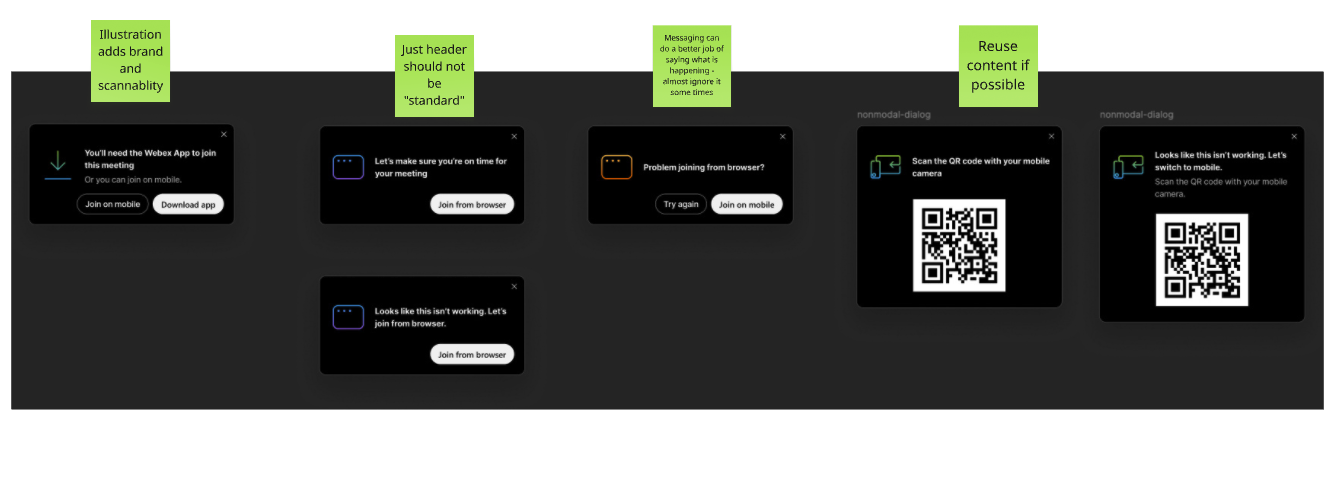
One hill I fought hard to defend but lost was sticking with industry-standard content structures—header, description, buttons.
But PMs wanted everything shorter. Usually, I love shorter. But this was crossing a line. And I wasn’t for it.
Three “aha” moments for me along the way:
Errors live in the middle of conversations. They’re always responses to something, not standalone pronouncements. We can use that to our advantage in the language.
Don’t state the obvious. Writing “Can’t do X” is like telling someone “the door is locked” right after watching them rattle the doorknob. Pretty useless info.
Use buttons as part of the conversation. So don’t have information like “Try joining from browser blah blah blah” followed by a button that repeats it: “Join from browser.” Instead, use the button as part of the message.
So I got to writing.
Got feedback from the team, tweaked again, and kept refining.
A few highlights worth showing off, like the consolidated “can’t join” catch-all message.
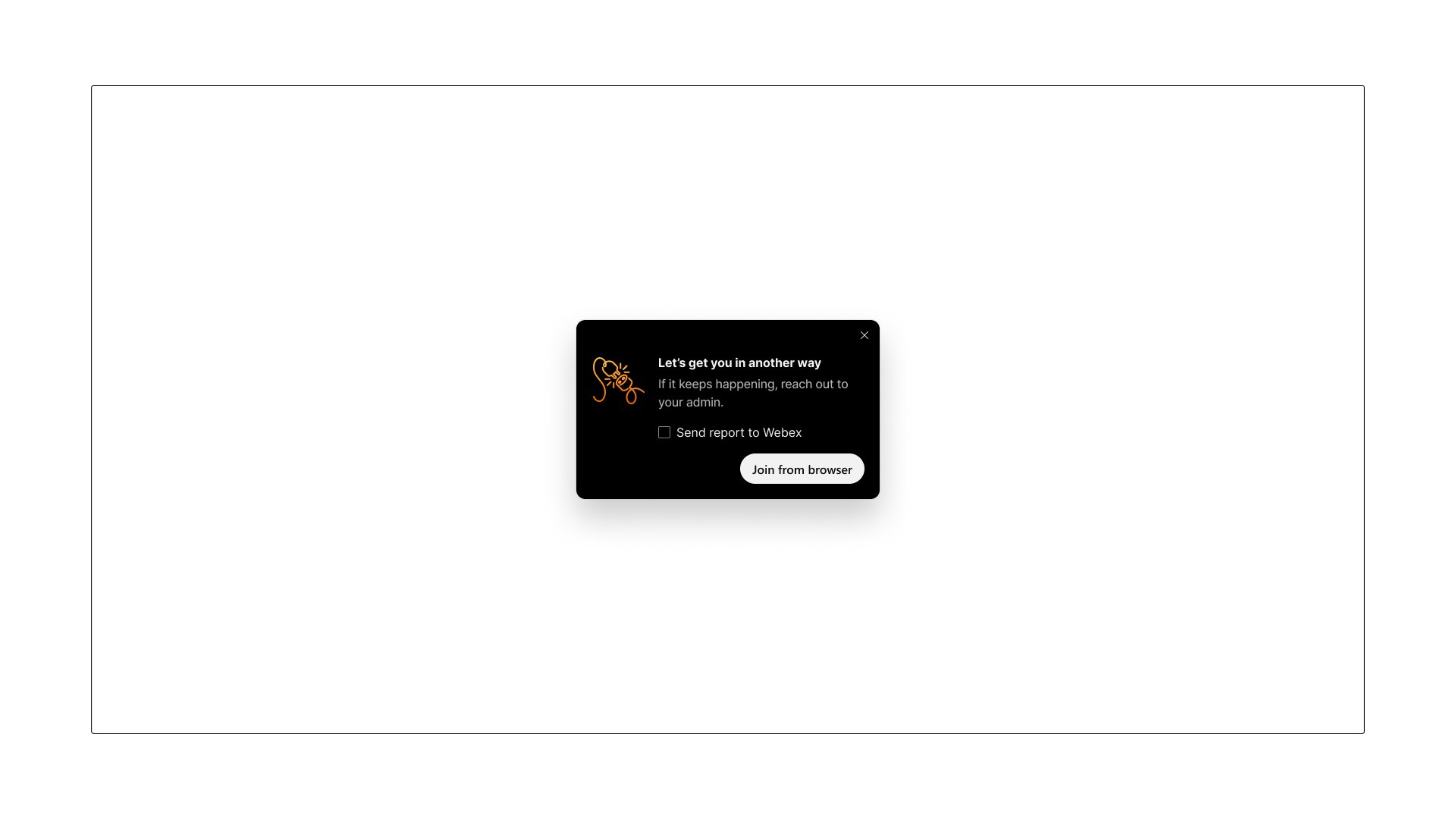
A little on why…
Keeps the flow moving:“Let’s get you in another way” feels like part of the chat, not a giant red stop sign.
Avoids the obvious: No need to waste space telling users what they already know (connection issue or can’t do that = duh).
Simple and reassuring: Short, calm phrasing that takes the sting out of the error. Making it almost not feel like an error at all.
Okay, last one I want to call out, mainly because I’m proud of how much simpler I made it compared to the original.
But first, some setup (otherwise it won’t make sense). For free accounts, if everyone is on free plans and someone tries to make a call in space, they can’t. Someone needs to upgrade.
Great, now that you’ve got the context, here’s the message before:
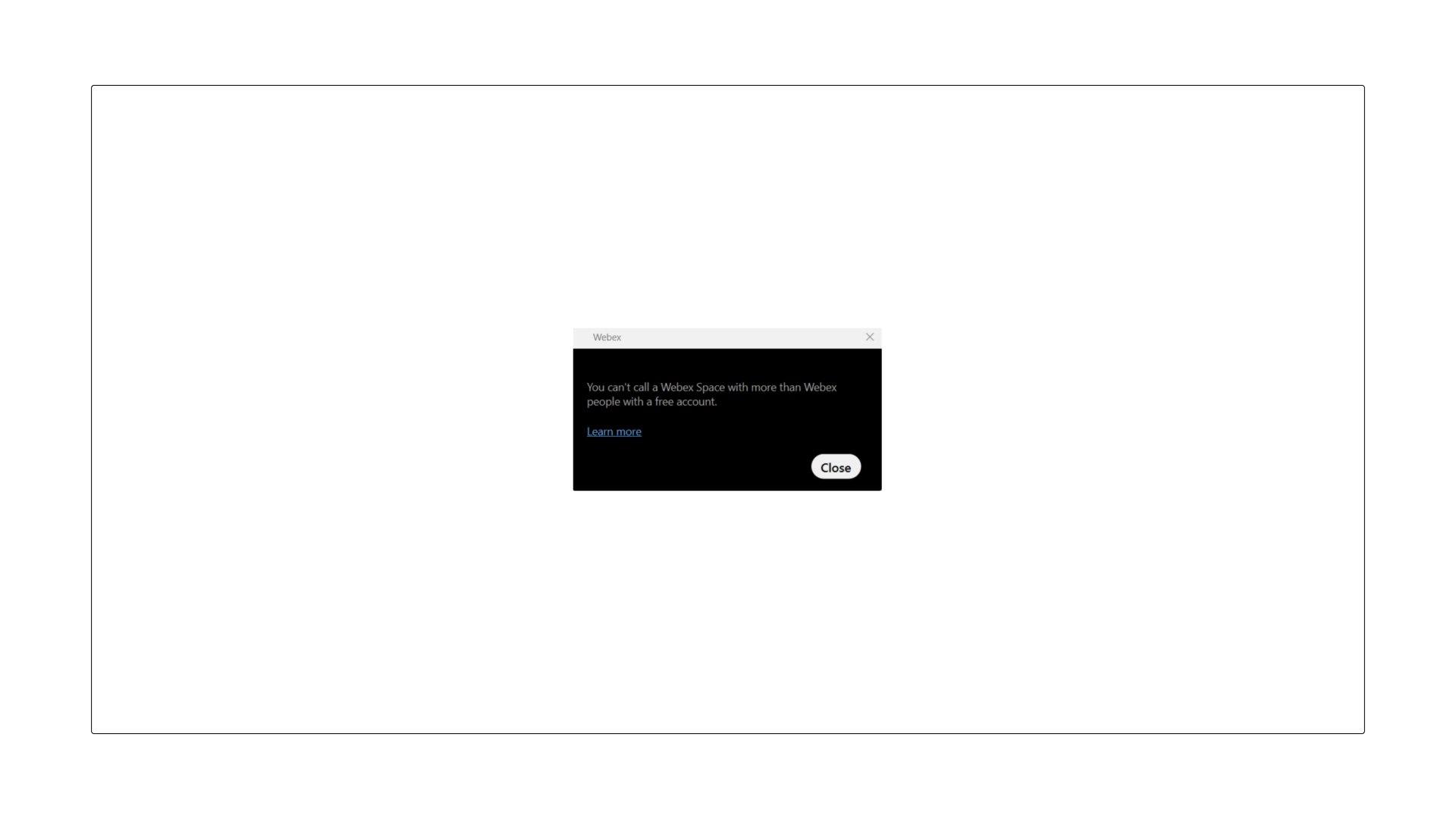
Took me three days (multiple rounds of bugging PMs and engineers) just to wrap my head around what this thing was trying to say.
So here’s mine.
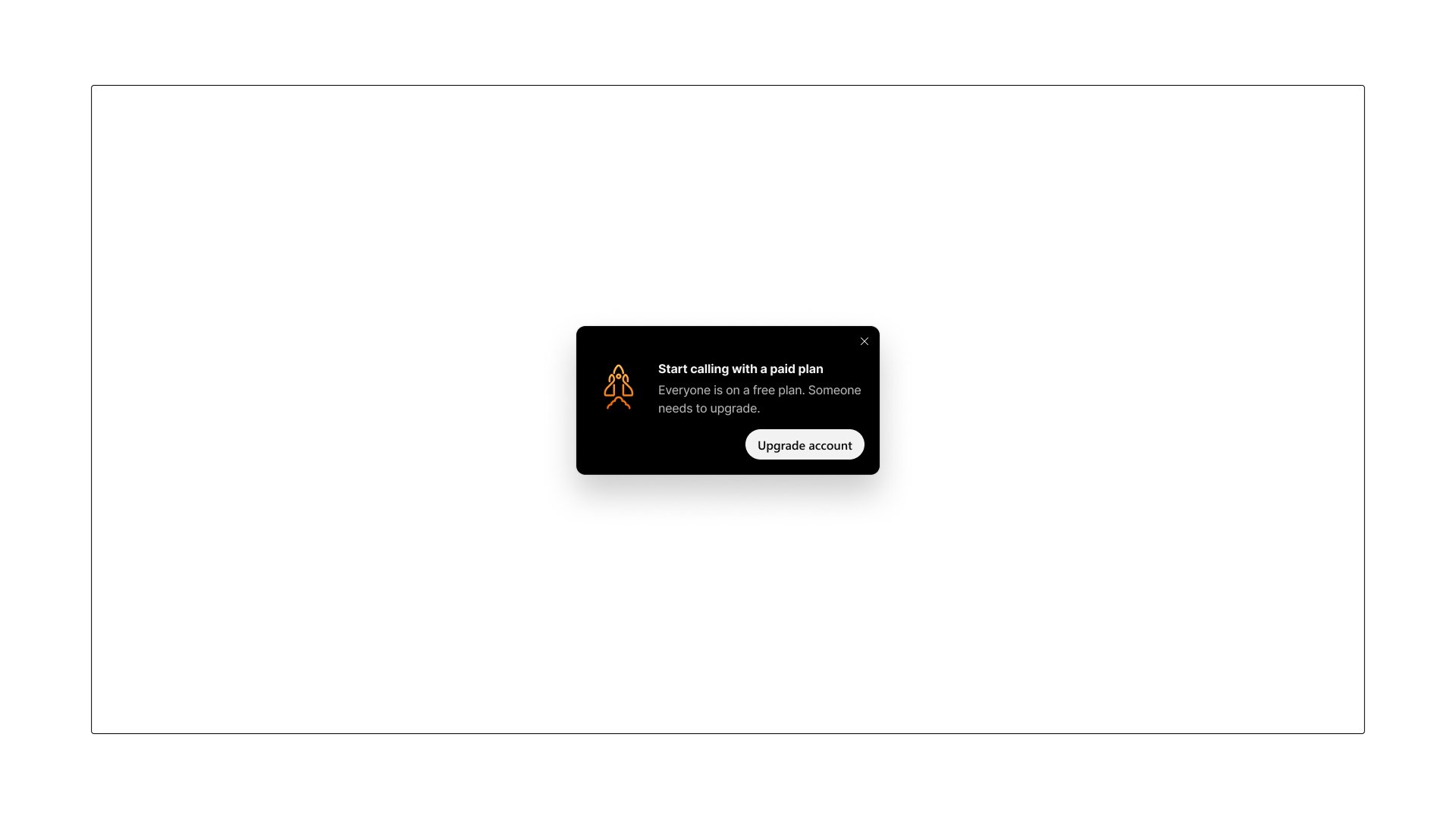
I think it makes more sense, but I will let you decide.
Here are my reasons why:
Keeps momentum: “Start calling with a paid plan” feels like guidance, not a dead end.
Simple & scannable: Short headline, short body, one clear action.
Reassuring clarity: Explains the “why” (everyone’s on a free plan) without drowning users in fine print.
Action aligned: The CTA (“Upgrade account”) is the exact next step. No guesswork.
By cutting 65 errors down to 17 (after further debate), I not only reduced user frustration through clearer writing but also gave engineers a saner, more maintainable codebase with less noise and faster debugging.
Once we had all the errors for this flow. I wanted to make sure the approach to error messages scaled to the org.
So I created an Error message content pattern that lives in our guidelines and our AI generation tool.
Not much of a story here.
Just a radio spot I wrote while still in school for Krispy Kreme.

I wrote, produced, and sourced the voice talent.
Writing radio spots is a sport of its own—fast, fun, and full of personality.
They’re a blast to think through and create.
It may or may not have been influenced by my life.
Hope you enjoy this one.